Warehouse arrival photos and basic QC: what they show and what to do next
When a parcel reaches the warehouse, its arrival time and the warehouse photos appear on the order under Arrival records & evidence. Basic QC photos are visible checks, not functional testing. If a photo shows a problem, contact support within 5 days after the order status changes to Stocked in.
Where to find it on the site
- Account
- Orders
On a phone, these are in the menu at the top right.
Have these ready
- An order whose parcels have reached the warehouse
- The color, size, model and quantity you ordered
-
Step 1: Find the arrival record and photos
Open the order with Details and scroll to Arrival records & evidence. Each parcel the warehouse received has its own entry.
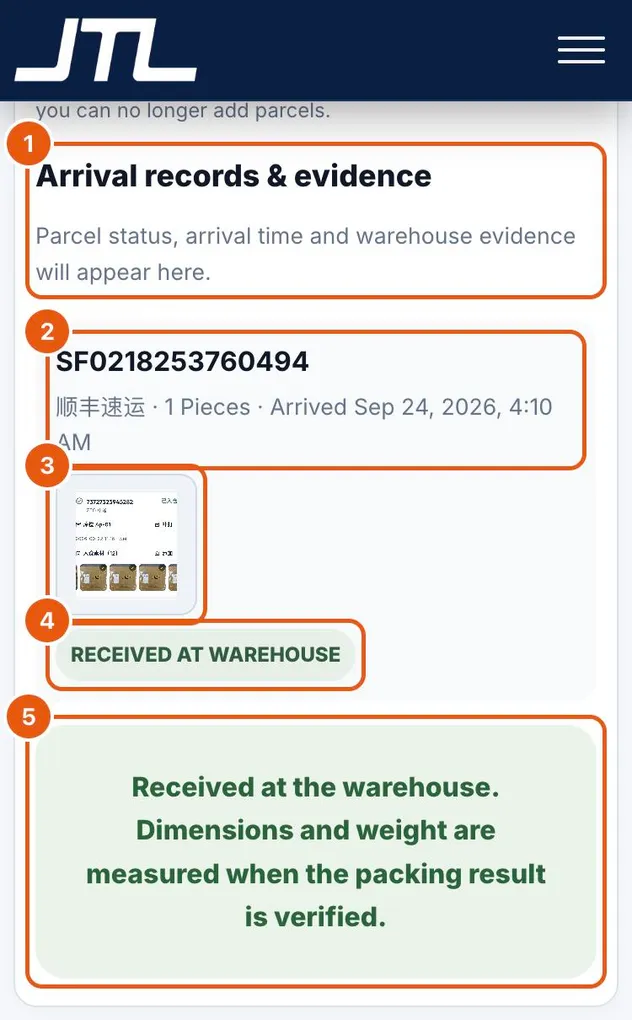
- Arrival records & evidence: parcel status, arrival time and warehouse evidence appear here.
- The domestic tracking number, the carrier, the number of pieces and when the parcel arrived.
- Warehouse photos taken on receipt. Tap a photo to open it at full size.
- The parcel status, for example Received at warehouse.
- Dimensions and weight are measured later, when the packing result is verified.
-
Step 2: Compare the photos with what you ordered
Basic QC photos are visible checks. Compare them with the exact color, size, model and quantity you ordered.
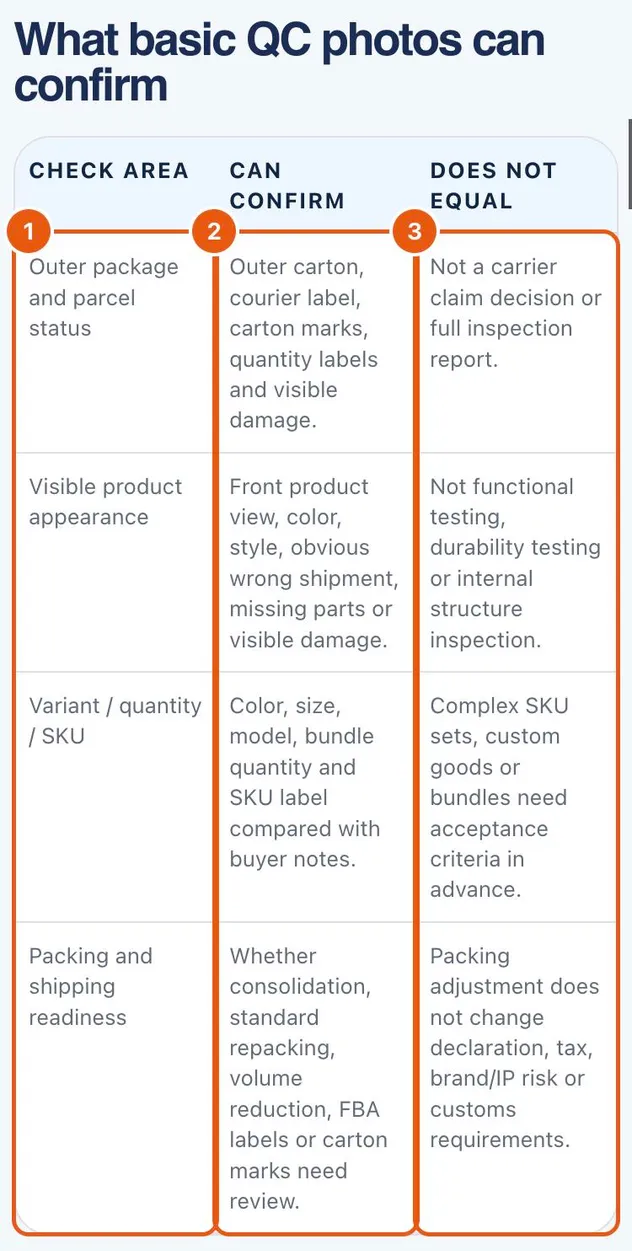
- Check areas: the outer package, the visible product, the variant, quantity or SKU, and packing readiness.
- Can confirm: carton, labels and visible damage; front view, color and style; an obvious wrong item or missing parts; color, size, model and quantity against your notes.
- Does not equal: functional or durability testing, internal inspection, a carrier claim decision or a full inspection report.
Tip: Need more than the standard photos? The pricing page lists detailed inspection photos at USD 1.50 per photo, a basic quantity count at USD 0.10 per piece and detailed SKU verification at USD 0.15 per piece (USD 5 minimum each). Complex SKU sets, custom goods or bundles need acceptance criteria agreed in advance.
What happens next
If the photos match your order there is nothing to do: the order moves on to packing. If a photo shows a wrong item, missing parts or damage, send support the order number and what is wrong within 5 days after the status changes to Stocked in. The warehouse photos are usually the strongest evidence for the seller.
Common questions
Are QC photos included?
For orders JTLGO buys for you, basic QC photos and videos are part of the purchasing service fee. Detailed inspection photos are USD 1.50 per photo.
What if a photo shows a problem?
Contact support with the order number within 5 days after stock-in. JTLGO raises it with the original seller, who decides on a return, exchange or refund. Costs caused by the seller's mistake are pursued with the seller, not charged to you.
Can basic QC replace a full inspection?
No. Basic QC covers what can be seen. Functional testing, lab testing or third-party inspection must be agreed separately.
When are weight and size measured?
When the warehouse verifies the packing result. The final cartons are what freight and warehouse fees are billed on.
Related
Was this page helpful?
Still stuck? Send us a link to this page and tell us which step you’re on.
Contact support