Order status explained: what each label means and what to do next
Open Account, then Orders. Orders that need you, such as an unpaid bill, sit at the top under Needs my action. Every other order shows its current status and the next thing that has to happen, and Details shows the full five-stage progress.
Where to find it on the site
- Account
- Orders
On a phone, these are in the menu at the top right.
Have these ready
- A JTLGO account with at least one order
-
Step 1: Find the orders that need you
The orders list puts action-needed orders first. Use the filter to see only those, or search by order number, case number or product.
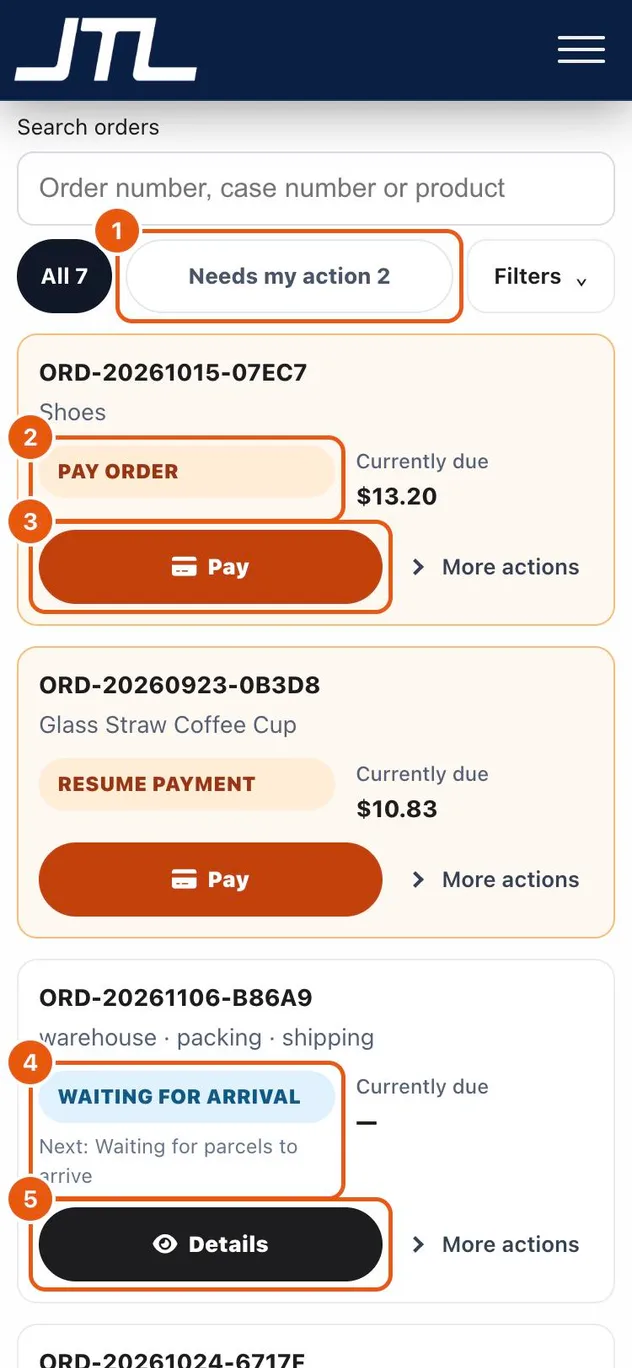
- Needs my action shows only the orders waiting for you. Filters also offers In progress, Completed and Cancelled.
- An orange label means you have something to do, such as Pay order or Resume payment. The amount currently due is shown beside it.
- Pay opens the checkout page for that order, where you choose how to pay.
- A blue label is a status you are waiting on. The Next line says what has to happen before it moves on.
- Details opens the order and its full progress.
-
Step 2: Open an order to see all five stages
Inside an order, the progress bar shows which of the five stages it has reached. Tap View full progress to see each stage and its result.
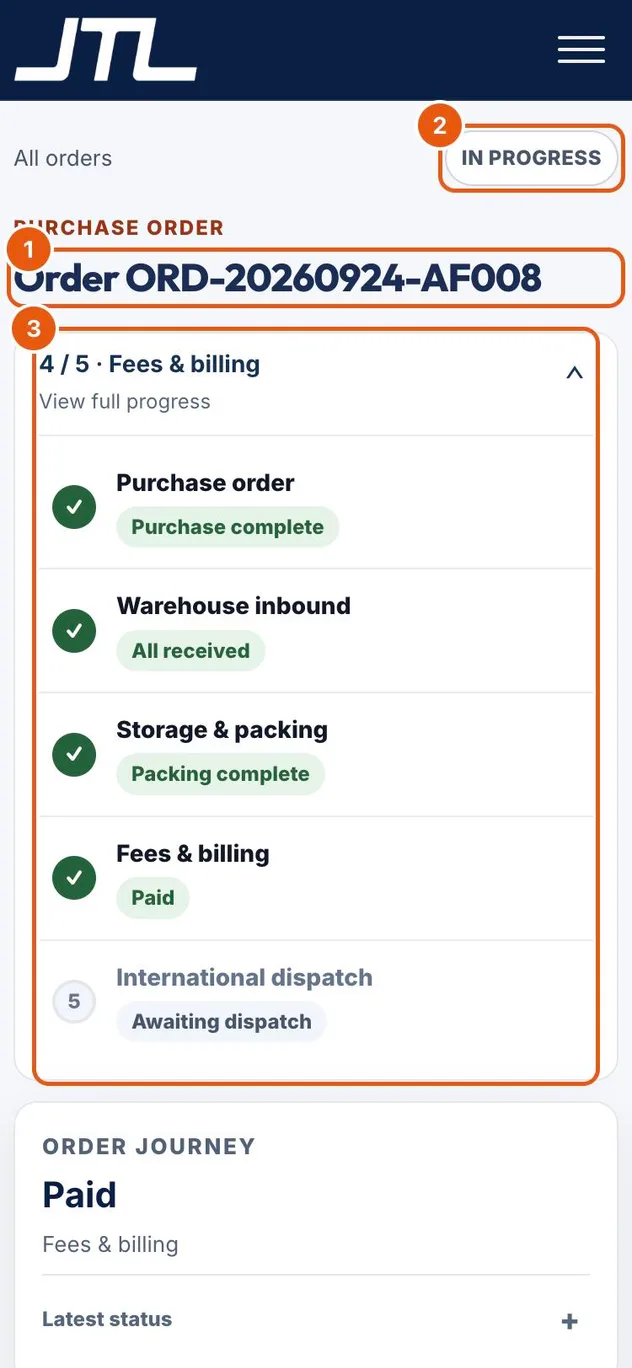
- The order number. Quote it when you contact support.
- The overall state: In progress, Completed or Cancelled.
- The five stages: Purchase order, Warehouse inbound, Storage & packing, Fees & billing and International dispatch. A tick means the stage is done.
Status labels
- Pay order
- The order is waiting for your payment. Tap Pay.
- Resume payment
- A payment was started but not finished. Tap Pay to complete it.
- Waiting for arrival
- The warehouse has not received the parcels yet.
- Partially received
- Some parcels have arrived; the warehouse is waiting for the rest.
- Received
- All parcels are at the warehouse.
- Packing / Packed
- The warehouse is packing the goods, or has finished and recorded the final cartons.
- Ready to ship
- Packing is done and the order is waiting for shipment.
- Ready for handover
- The goods are waiting to be picked up by your own forwarder.
- Shipped
- The goods have left for the destination. Use the tracking page to follow them.
- Completed / Cancelled
- The order is finished, or it was cancelled.
What happens next
When an order shows an orange label, act on it to keep the order moving. Blue statuses need nothing from you; the Next line tells you what JTLGO is waiting for.
Common questions
Why is my order stuck on Waiting for arrival?
The warehouse is still waiting for the parcels. Check that the seller has shipped them and that the domestic tracking numbers are on the order.
Where do I see warehouse photos and carton measurements?
Open the order with Details. Warehouse inbound shows each parcel as it arrives, and Storage & packing shows the final cartons with their size and weight.
What does Currently due mean?
It is the amount you still need to pay on that order. A dash means nothing is due right now.
Related
Was this page helpful?
Still stuck? Send us a link to this page and tell us which step you’re on.
Contact support