JTLGO Shopping Assistant · Chrome extension
Taobao and 1688 in English, with the total cost and shipping
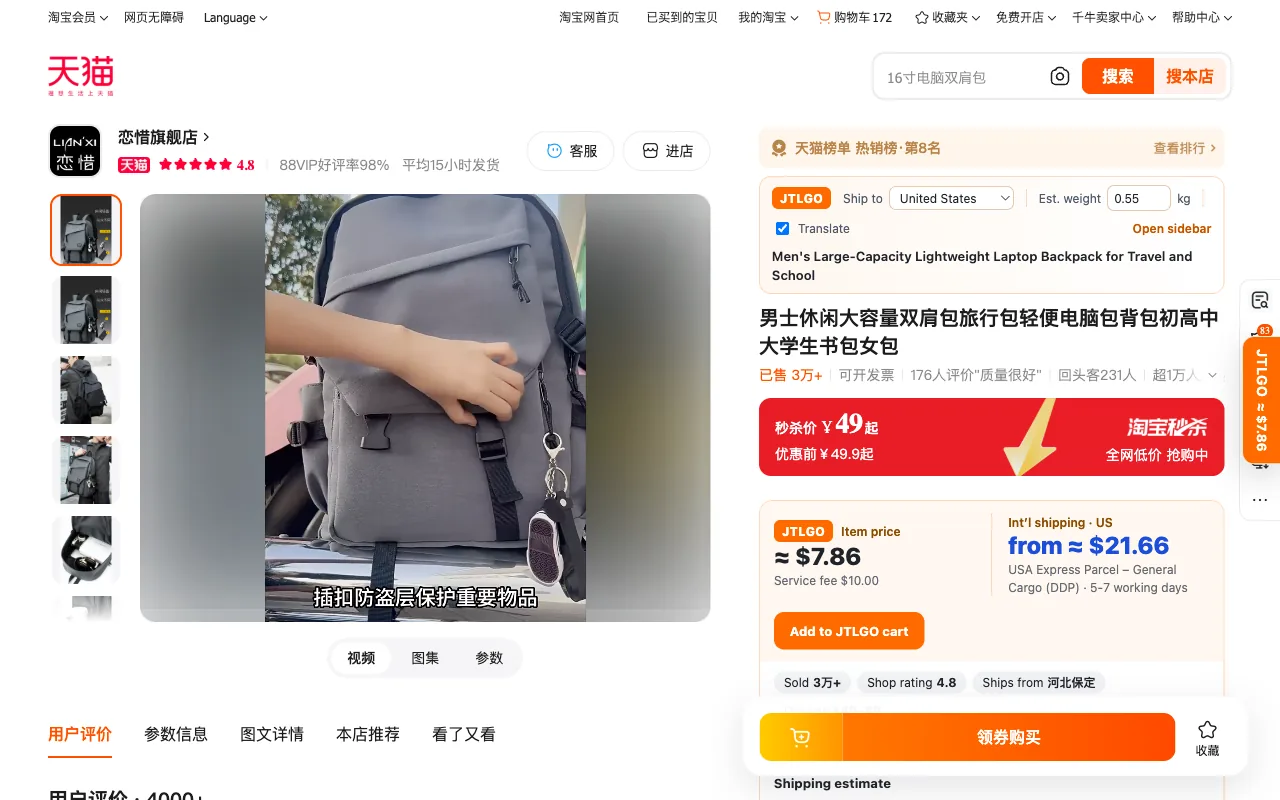
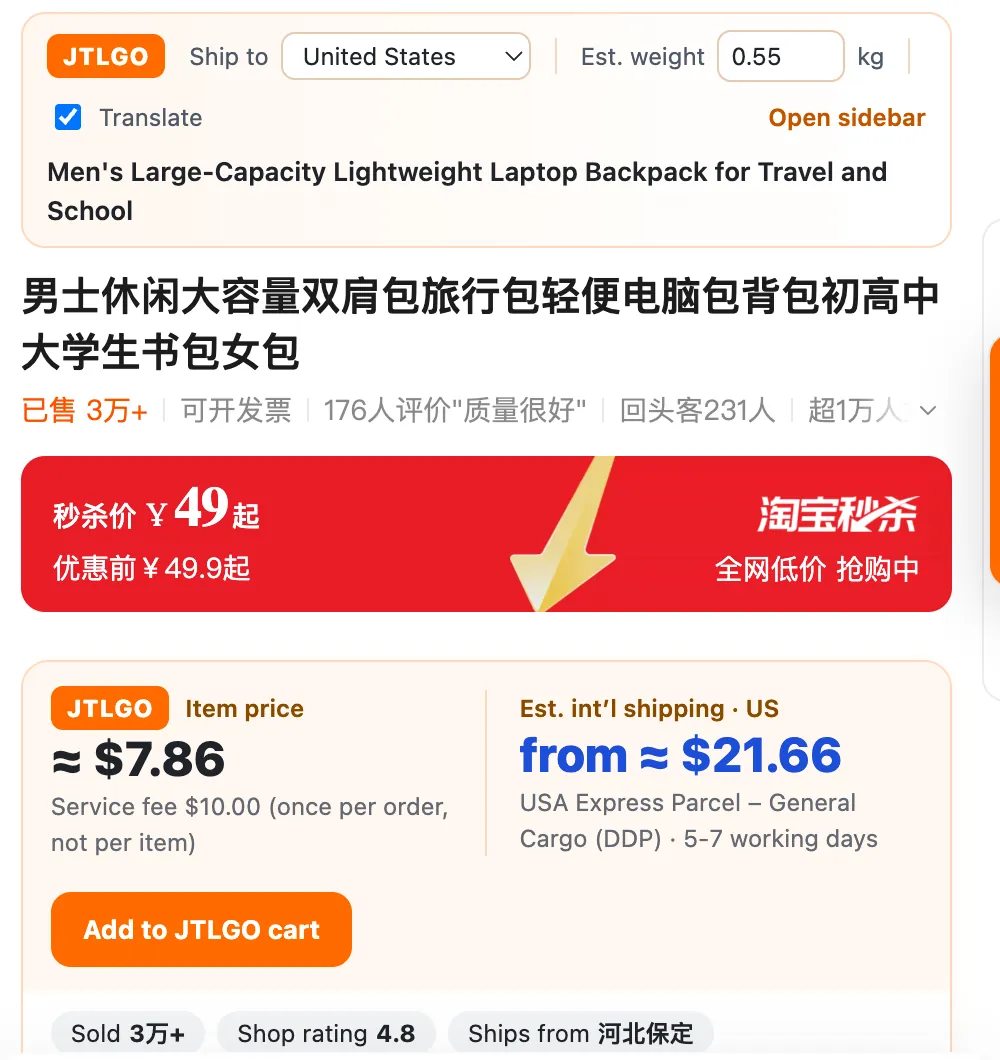
JTLGO Shopping Assistant translates product titles and options into English and adds a JTLGO card under the seller’s price: the item price in US dollars, the service fee and a shipping estimate to your country. Add items to your JTLGO cart and check out without leaving the page.
Works on
- Taobao
- Tmall
- 1688
- JD.com
- Pinduoduo
It only runs on the sites you switch on in the extension menu.
A shipping calculator on every product page
Under the price you see the item price in USD, the service fee and the shipping lines to your country with delivery times. Change the estimated weight and the shipping cost is recalculated. Sales, shop rating and ship-from city come from the page, with a warning when an item cannot ship or needs a special shipping line.
Check out inside the extension
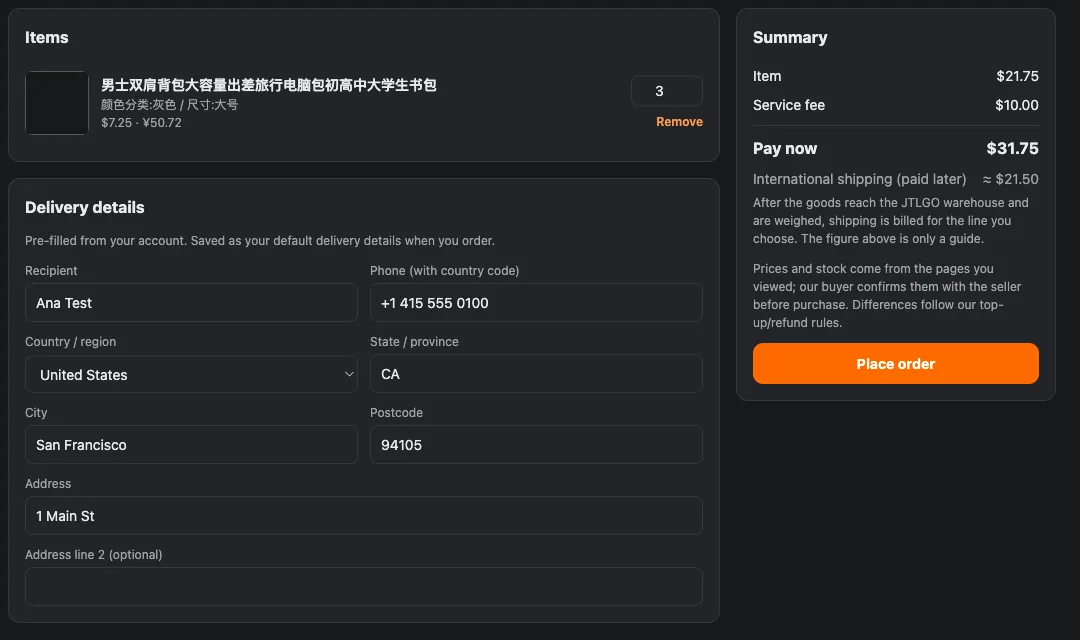
Add items from different shops to one cart, confirm your delivery details and place the order. Pay from your JTLGO balance, or open the jtlgo.com checkout for card and other methods. International shipping is billed later, after your goods are weighed at our warehouse.
Pre-alert parcels you bought yourself
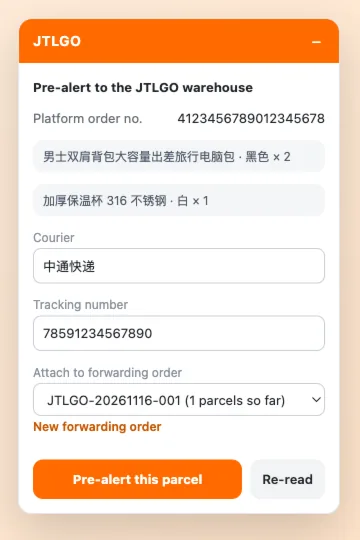
Already ordered from a seller? Open the order on the marketplace and send its tracking number to your JTLGO forwarding order in one click, so the warehouse knows the parcel is yours.
Also on the page
- Translation in 8 languagesProduct titles and options are translated into English, Spanish, French, Russian, Arabic, Vietnamese, Japanese or Korean. In search results, titles are translated too where Chrome’s built-in translator is available.
- Search resultsEvery product card in search results and shop lists gets a JTLGO line with the estimated cost and flags such as battery, may be prohibited or cannot ship to your country.
- Buying tipsA cheaper listing of the same item, low stock or a minimum order quantity is pointed out before you add to cart, and terms such as group price, pre-sale or MOQ are explained.
Start in three steps
- Add it to ChromeInstall JTLGO Shopping Assistant from the Chrome Web Store, then pin it from the puzzle icon in the toolbar.
- Connect your JTLGO accountOpen the extension and click “Connect JTLGO account”. Sign in on jtlgo.com, or create a free account there.
- Choose your country and sitesPick your destination country and switch on the marketplaces you use. Then open any product page.
What the extension can and cannot see
- It only runs on the marketplaces you switch on, and only reads the product, search or order page you are viewing.
- It never reads your marketplace passwords or cookies.
- It connects to your JTLGO account with a token you can disconnect at any time from the extension menu.
Questions about the extension
- What is JTLGO Shopping Assistant?
- A free Chrome extension from JTLGO, a China buying agent and forwarder. On Taobao, Tmall, 1688, JD.com and Pinduoduo it translates product titles and options into your language and shows the item price in USD, the service fee and the international shipping cost to your country. You can then order through JTLGO without leaving the page.
- Can I see Taobao and 1688 in English?
- Yes, product by product. With the extension on, each product page shows the title and options in English (or Spanish, French, Russian, Arabic, Vietnamese, Japanese or Korean). The rest of the marketplace page stays in Chinese.
- Is the extension free?
- Yes. Installing and using it is free. When you order, you pay the same as on jtlgo.com: the item price, the JTLGO service fee and international shipping, which is billed after your goods are weighed.
- Which shopping sites does it support?
- Taobao, Tmall (including Tmall Global), 1688, JD.com and Pinduoduo. It does nothing on sites you have not switched on.
- Are the prices on the JTLGO card final?
- They are estimates. The item price comes from the page you viewed, and our buyer confirms price and stock with the seller before buying; differences follow our top-up and refund rules. Shipping is billed for the line you choose once the parcel is weighed.
- Does it work on my phone or in other browsers?
- It needs Chrome 111 or later on a computer. Chrome on phones does not run extensions; on a phone, paste the product link on the JTLGO shopping page instead.
- I can’t open the Chrome Web Store. What can I do?
- Download the package from our manual install page and load it in chrome://extensions. A manually installed copy does not update itself, so switch to the Chrome Web Store version when you can.
- Is JTLGO part of Taobao or 1688?
- No. JTLGO is an independent buying agent and forwarder, not affiliated with Taobao, Tmall, 1688, JD or Pinduoduo.
Shop Chinese marketplaces with the full cost in view
Free to install. Works on five marketplaces and connects to your JTLGO account.