Add 1688 products to your store and set your price
Under Account › Store connections, paste a 1688 product link, choose the country you sell to and click Import. JTLGO shows the delivered cost of each variant. Set your markup and publish the product to your store as a draft, then review it in your store and make it live.
Where to find it on the site
- Account
On a phone, these are in the menu at the top right.
Have these ready
- A connected WooCommerce or Shopify store
- A 1688 product link (detail.1688.com) or its offer ID
-
Step 1: Import a 1688 product
Scroll to Dropshipping products. Paste the product link, choose where your customers are and click Import.
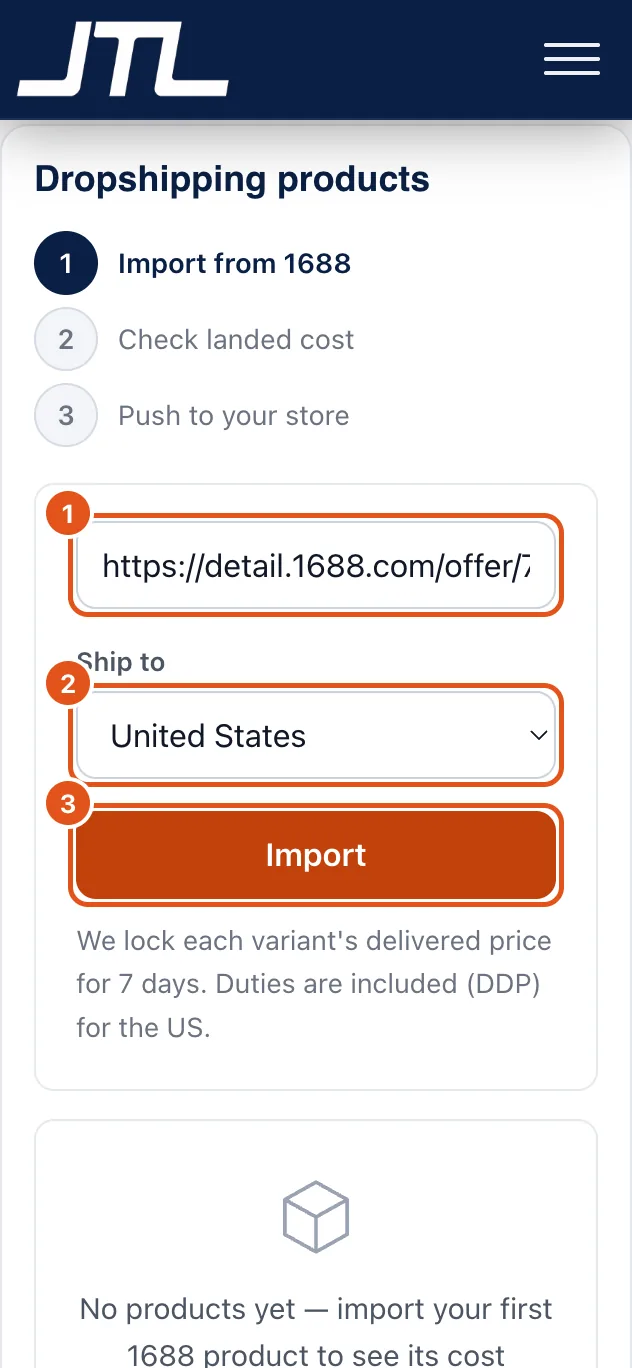
- A 1688 product link or its offer ID (the number in the link). Taobao links are not accepted.
- Ship to: your customer's country. The cost depends on it, so import the product once for each country you sell to.
- Import.
-
Step 2: Check the delivered cost
Each variant shows what one piece costs, delivered to your customer. Only factory sellers that sell single pieces, have stock and ship within 3 days are accepted.
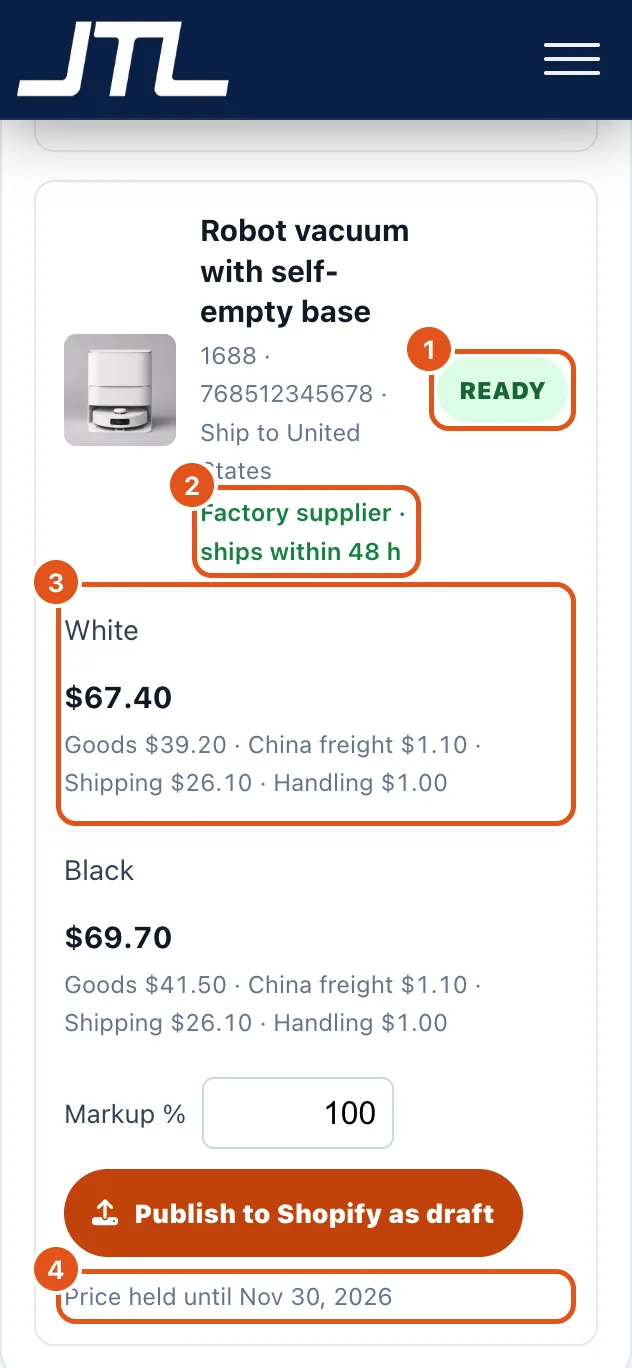
- Status. Ready means you can publish it.
- The supplier check: a factory seller and how soon it ships.
- The cost of one piece: goods, China freight, international shipping and handling. For the United States, duties are included.
- The cost is held for 7 days. After that, new orders are charged at the cost on the day.
Tip: If the supplier's box is large, a note may say the parcel could be billed on its size. Your order is charged on actual weight first; any difference is settled after the parcel is weighed.
-
Step 3: Add a weight if asked
Sometimes the supplier gives no weight for a variant. The product then shows Needs weight, and you enter it yourself.
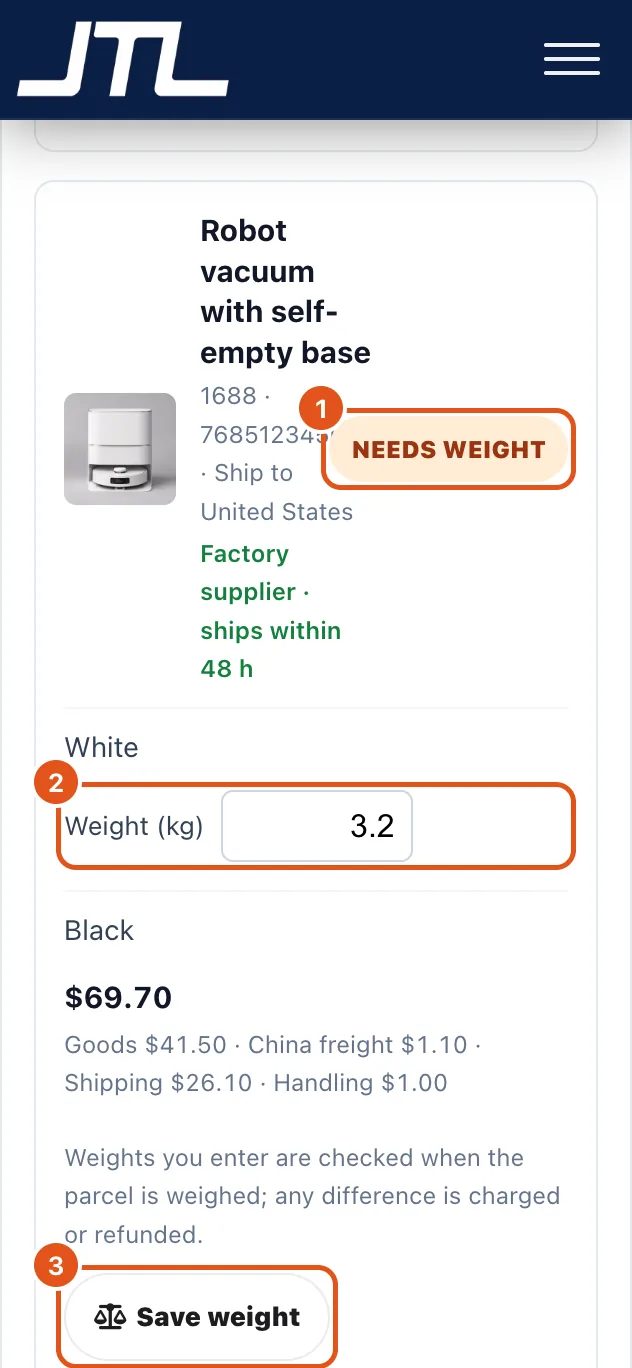
- Needs weight: one or more variants have no weight yet.
- The weight of one packed piece, in kg (0.01 to 30).
- Save weight. It is checked when the parcel is weighed, and any difference is charged or refunded.
-
Step 4: Set your markup and publish
Choose how much to add on top of the cost, then publish. JTLGO creates the product in your store as a draft, with photos, variants and prices.
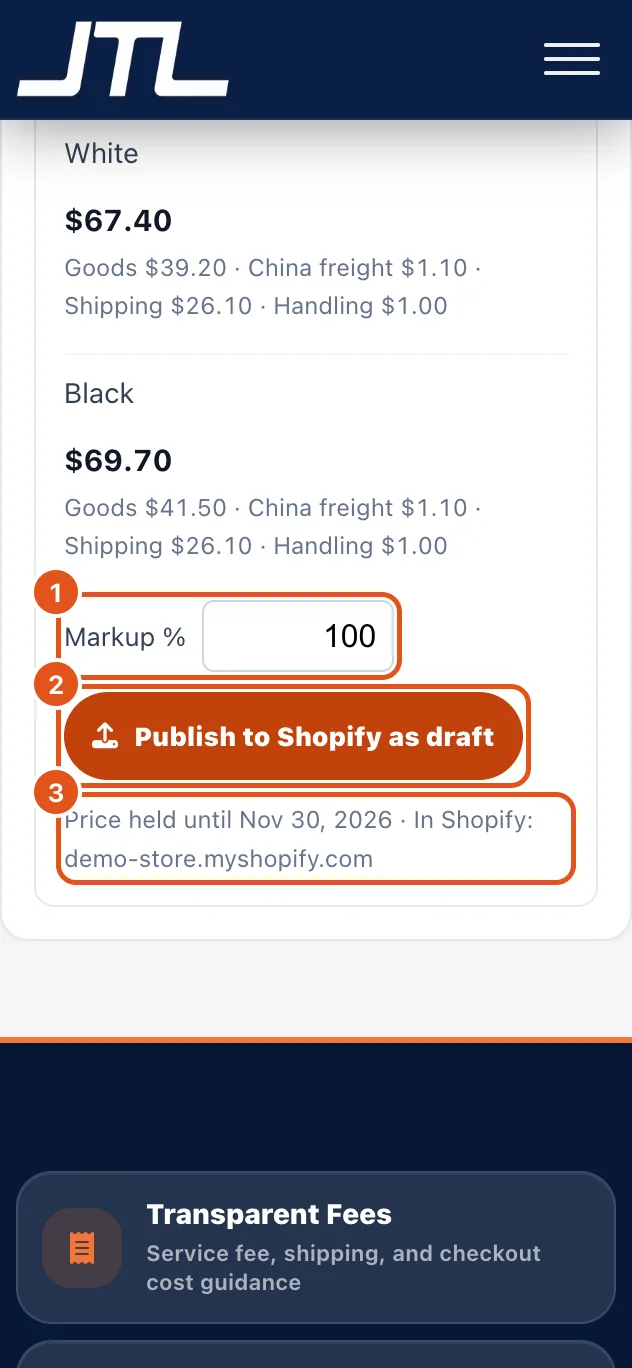
- Markup %: your selling price is the delivered cost plus this percentage. The default 100% doubles the cost.
- Publish the product to your store as a draft. Publishing again updates the same product.
- Where the product was published, and how long the cost is held.
Tip: WooCommerce stores in EUR, GBP or JPY get prices converted at the day's rate. Shopify gets the price in US dollars without conversion, so if your Shopify store sells in another currency, set the price in Shopify before you make the product live.
What happens next
Open the draft in your store, check the title, photos and description, then make it active. Orders for it are paid from your JTLGO wallet.
Common questions
What do the other statuses mean?
Under review: we are still checking the product; wait for our review. Cannot be shipped: the product is restricted or branded, or the seller failed our supplier check; import a different listing. Unavailable: no price could be worked out or the seller removed it; choose another product.
Which sellers are turned down?
Trading companies instead of the factory, pre-sale listings without stock, sellers that take more than 3 days to ship, and listings that do not sell single pieces. Look for the same product from its factory.
Will my store price change when the supplier's price changes?
No. We check your products every day before the price hold ends and email you if the cost rises by more than 3%, a variant sells out or the product is removed. Your store prices are never changed for you, but new orders are charged at the new cost.
How many products can I import?
There is no limit on the total, but you can import up to 10 products a minute.
Related
Was this page helpful?
Still stuck? Send us a link to this page and tell us which step you’re on.
Contact support